
LinkedIn Job Search
If you’re struggling to find a job, you’re not alone. The modern job search is tough. Just submitting applications isn’t enough.
The good news is that if you use LinkedIn the way it can be, it can be a powerful tool to find jobs, connect with recruiters, and land your dream role.
This guide is a LinkedIn job search tutorial to help you understand how to use LinkedIn to find a job, apply smarter, and improve your chances.
Table of Contents
Why LinkedIn Is Essential for Job Search
🔹 The Power of LinkedIn in Today’s Job Market
LinkedIn is more than a social network. It’s a job board, networking platform, and personal branding tool.
- Millions of job opportunities are posted daily
- You get access to recruiters and hiring managers
- You can use search strategies to refine your results
👉 If you’re not using LinkedIn properly, you’re missing out.
How to Use LinkedIn to Find Jobs Effectively
🔹 Optimize Your LinkedIn Profile First
Before you start your job search, your profile must be complete.
✅ Key elements:
- A professional headline with keywords
- A clear summary showing your skills and qualifications
- An updated experience section
- The “Open to Work” feature enabled
👉 A strong LinkedIn profile increases your visibility in search results.
🔹 Use the LinkedIn Search Bar Smartly
The search bar at the top of the LinkedIn homepage is your tool.
Example:
Search for a job using keywords like:
“Digital Marketing Specialist”
“Remote Customer Support”
👉 Click on the Jobs tab to see job listings
🔹 Use Filters to Refine Your Search
LinkedIn allows you to narrow down your search:
- Location
- Experience level
- Job function
- Remote jobs
- Date posted
👉 Using filters helps you find the job faster.
Best Search Strategies to Find Jobs on LinkedIn
🔹 Use Relevant Keywords
Recruiters search using keywords.
Make sure your search query includes:
- Job titles
- Skills
- Industry terms
This improves your job search results.
🔹 Save Jobs and Set Job Alerts
- Save jobs to Saved Jobs
- Enable job alerts for new job postings that match your criteria
This keeps you updated without searching.
🔹 Apply Consistently
A successful job hunt requires consistency.
- Apply to jobs daily
- Don’t rely on one application
Volume increases your chances.
⚠️ Common Mistakes in LinkedIn Job Search
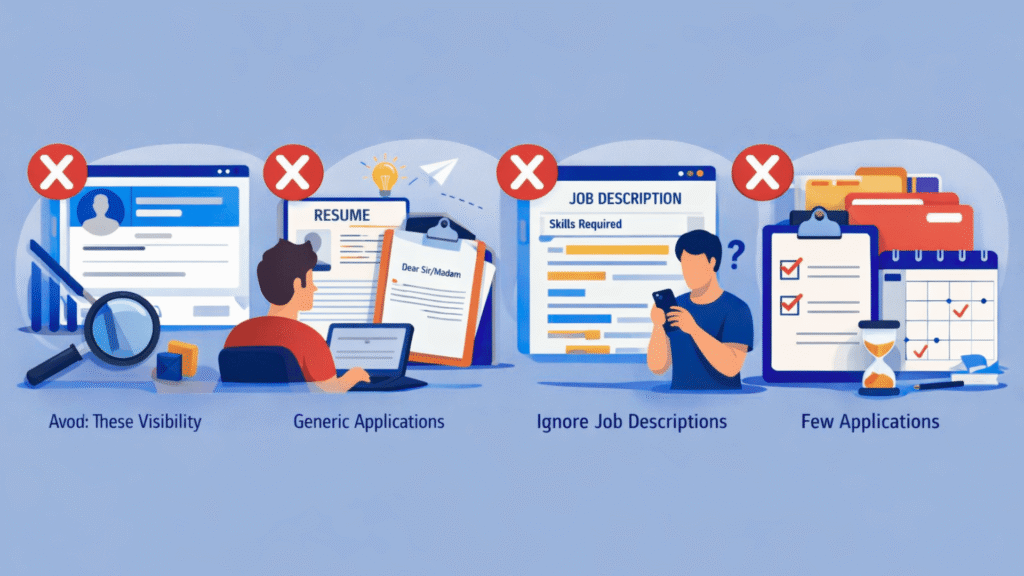
Avoid these mistakes:
❌ Not Updating Your Profile
Profiles reduce visibility.
❌ Applying Without Customization
Generic applications don’t stand out.
❌ Ignoring Job Descriptions
Each job post includes details about required skills.
❌ Applying to Few Jobs
Limited applications = limited results.
How to Apply for Jobs on LinkedIn the Smart Way
🔹 Use Easy Apply Feature
The Easy Apply option allows you to quickly apply for jobs.
Be careful:
- Many candidates use it
- Competition is high
🔹 Apply Through Company Websites
Sometimes it’s better to apply via the company’s website.
👉 This can increase credibility and visibility.
🔹 Connect with Hiring Managers
- Send a message
- Express interest in the role
This increases your chances of being noticed.
👉 You can check this professional service that applies to hundreds of jobs for you and saves hours of effort.
💼 The Challenge: Why Job Search on LinkedIn Is Still Hard

With all these tools, many users still struggle to find a job through LinkedIn.
Reasons:
- competition
- Time-consuming process
- Manual applications
- Limited daily applications
This is where most job seekers get stuck.
🔥 A Smarter Way to Search and Apply for Jobs
Let’s be realistic…
Manually applying to dozens of jobs every day is exhausting.
That’s why many professionals now use a method:
👉 Outsourcing the application process
of doing everything yourself you can:
- Save time
- Apply to more jobs
- Focus on interviews
📦 Professional Help for LinkedIn Job Search
Today there are services designed to help you search and apply for jobs on LinkedIn efficiently.
These services can:
- Apply to hundreds of jobs
- Target relevant positions
- Optimize your job application strategy
👉 This approach is becoming increasingly popular in the job market.
⭐ Benefits of Using LinkedIn Job Search Help
✅ Save Time
No hours spent scrolling and applying.
✅ Increase Your Chances
applications = more exposure.
✅ Reduce Stress
Focus on preparing for interviews
✅ Better Targeting
Applications are aligned with your profile.
🎯 Best Practices to Land Your Dream Job
To maximize results:
- Keep your LinkedIn profile updated
- Use relevant keywords
- Apply consistently
- Track your job search process
- Stay active on LinkedIn
These best practices help you stand out.
Using LinkedIn Mobile App for Job Search
The LinkedIn mobile app makes it easier to:
- Search for jobs
- Apply instantly
- Get job alerts
Perfect for staying active during your job hunt.
FAQ — LinkedIn Job Search Help
1. How effective is LinkedIn for job search?
Very effective when used correctly with search strategies and optimization.
2. How many jobs should I apply for daily?
10–20 jobs per day for better results.
3. What is Easy Apply on LinkedIn?
A feature that allows you to quickly apply for a job without leaving LinkedIn.
4. Why am I not getting job responses?
Possible reasons:
- Weak profile
- application volume
- High competition
5. Should I use LinkedIn Premium?
It can help with insights, but it’s not mandatory.
Final Verdict
Mastering LinkedIn job search is not about applying to jobs. It’s about using the right search strategies, optimizing your profile, and staying consistent.
However, the process can be time-consuming and overwhelming, especially when you’re trying to apply to dozens or even hundreds of jobs.
That’s why many smart job seekers are now choosing to use LinkedIn to find opportunities efficiently by leveraging professional help.
If you’re serious about landing your role faster and want to avoid the stress of manual applications, using a service that can search and apply for jobs on LinkedIn on your behalf can dramatically increase your chances.
Take action today. Start applying smarter. Not harder.
👉 Ready to land your next job faster?
Instead of spending hours every day applying manually, you can use a professional service that handles everything for you—from searching to applying to hundreds of jobs.
✅ Apply to up to 600 jobs
✅ Save time and effort
✅ Increase your chances of getting interviews